How to Adjust the Extra Parameters in the SETUP tab?
How to Adjust the Extra Parameters in the SETUP tab?
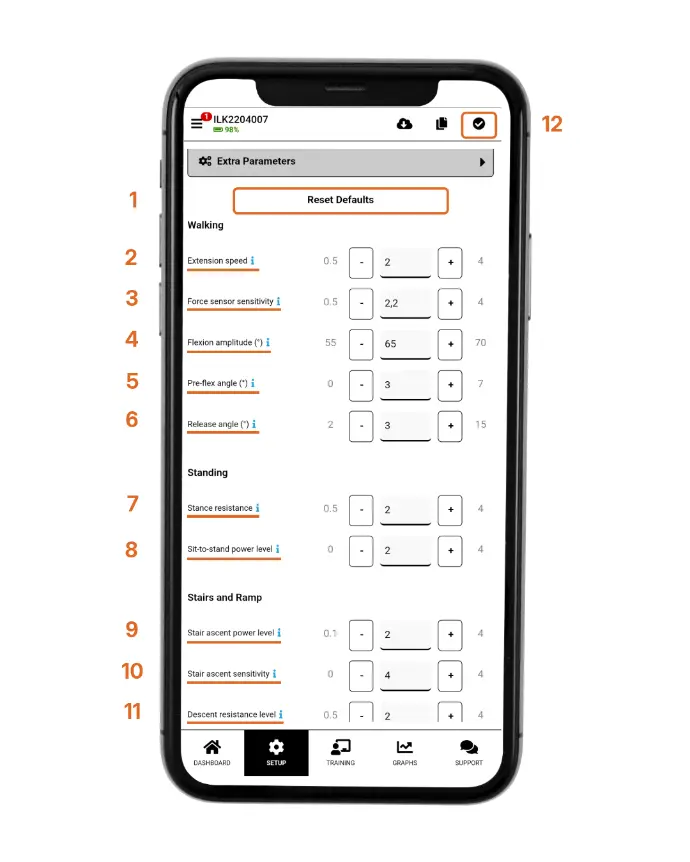
1. Reset Defaults
Reset the extra parameters shown in this accordion to factory default.
2. Extension Speed
Adjusting the
extension speed impacts how early swing extension is triggered. The higher the
value, the sooner extending starts during walking.
3. Force Sensor Sensitivity
The higher the value,
the easier it is to trigger swing.
4. Flexion Amplitude
Flexion amplitude is the maximum flexion angle that Intuy Knee will reach while walking. The bigger the value, the lighter it feels to bring the prosthetic leg forward. 65-70 degrees is recommended.
5. Pre-flex Angle
Pre-flex angle is how
far the knee is extending during terminal swing. The higher the value, the more
stance yielding.
6. Release Angle
The higher the value the bigger hip extension to trigger the swing. ATTENTION! Values below 5° can lead to swing mistriggers during reaching and stopping movements.
7. Stance Resistance
Stance resistance affects the resistance while sitting down. The higher the value, the more resistance.
8. Sit-to-Stand Power Level
The higher the value,
the more support user gets while standing up.
9. Stair Ascent Power Level
The higher the value,
the more support user gets while climbing the stairs.
10. Stair Ascent Sensitivity
The bigger the value, the easier it is to trigger stairs.
11. Descent Resistance Level
The bigger the value, the higher resistance when descending stairs or ramps.
12. Save Settings
Click the checkmark
after making any changes to save them.
Note: When adjusting these parameters, make sure the user is aware of the change. Perform the adjustment in a safe environment, such as on level ground not on stairs, while standing still and not while walking.
There are no comments for now.
to be the first to leave a comment.